생성형 AI 미니 프로젝트(1): 실시간 STT, 번역 (초기 API 연결)
Skala 과정에서 생성형 AI 대해 새롭게 알게 되었습니다.
생성형 AI 수업 중 진행하게 된 미니 프로젝트 구현 과정을 기술합니다.
교수님께서 “실시간” “음성” 기반 “B2B” 인공지능 미니 프로젝트를 한 번 만들어보라고 하셔서
저희 조는 해외 출장이 잦은 회사를 다니는 회사원들을 위해 실시간 번역 및 OCR 기반 출장 경비 보고서 작성 모델을 서빙하는 플랫폼을 제작하기로 했습니다.
초기 구상
큰 기능은
- 실시간 양방향 번역
- 영수증 기반 출장 보고서 작성
입니다.
저 두 개만 하더라도 약 10일,,정도의 시간이 주어졌기 때문에 굉장히 촉박할 것 같아서 기능을 축소했습니다.
조원들과 함께 기능명세서 및 API 명세서, 와이어프레임도 작성했습니다 ^-^
이 중 제가 맡은 역할은 실시간 양방향 번역 기능 및 Fast API(백엔드) 구성입니다!
실시간 STT 기능 초기 구성하기
Google의 Speech-To-Text API를 사용해서 STT 기능을 구현했습니다.
아직 실시간으로 음성을 받아오는 방식에 대해 논의를 더 해봐야 할 것 같아서
음성을 반환하는 방식만 실시간으로 진행될 수 있도록 Event Stream을 통해 결과값을 반환하도록 구현해두었습니다
Google Speech-To-Text API 사용 설정
사실 이 과정이 가장 힘들었습니다 ^.^
오로지 공식 문서를 보고 구현을 완료했는데,
가이드 기능을 지원해주어서 굉장히 쉽고 편안하게 API 사용 설정을 완료할 수 있었습니다!
스트리밍 입력의 오디오를 텍스트로 변환하는 기능도 있었지만,
프론트에서 음성을 백엔드로 어떤 방식으로 전달할지 아직 정해진게 없어서
일단은 음성 파일을 입력하고 스트림 방식으로 결과 값을 반환받도록 구현했습니다.
저는 이 문서를 참고했습니다.
초기에 환경 구성을 하는 방법은 튜토리얼 기능을 사용했습니다.
아마 gcloud 까지 연동을 해야만 STT 기능을 사용할 수 있는 것 같아서
가이드를 따라 gcloud도 설치했습니다.
.py 파일로 연결 테스트하기
먼저 라이브러리를 설치해주세요!
1
pip install google-cloud-speech python-dotenv gtts
그 다음 json 파일로 다운받을 수 있는 API Key를 이용해서 실제로 연결이 되는지 확인을 해보겠습니다.
공식 문서에 있던 코드를 그대로 복붙해서 돌리려는데 오디오 파일이 없어서…
[ gtts.py ]
1
2
3
4
5
6
7
8
9
from gtts import gTTS
import os

# 텍스트 정의
text = "The learning principle of an AI model is a process of adjusting internal weights using input data so that it can produce the desired output."

# TTS로 MP3 생성
tts = gTTS(text)
tts.save("./tts/ai_learning.mp3")
이렇게 tts 코드를 작성해서 음성 파일을 생성했습니다 ㅎㅎ
[ google-stt-stream.py ]
1
2
3
4
5
6
7
8
9
10
11
12
13
14
15
16
17
18
19
20
21
22
23
24
25
26
27
28
29
30
31
32
33
34
35
36
37
38
39
40
41
42
43
44
45
46
47
48
49
50
51
52
53
54
55
56
57
58
59
60
61
62
63
64
65
66
67
68
import os
from dotenv import load_dotenv

from google.cloud.speech_v2 import SpeechClient
from google.cloud.speech_v2.types import cloud_speech as cloud_speech_types

load_dotenv()
project_id = os.getenv("PROJECT_ID")
api_key = os.getenv("API_KEY")

def transcribe_streaming_v2(
    stream_file: str,
) -> cloud_speech_types.StreamingRecognizeResponse:
    """Transcribes audio from an audio file stream using Google Cloud Speech-to-Text API.
    Args:
        stream_file (str): Path to the local audio file to be transcribed.
            Example: "resources/audio.wav"
    Returns:
        list[cloud_speech_types.StreamingRecognizeResponse]: A list of objects.
            Each response includes the transcription results for the corresponding audio segment.
    """
    # Instantiates a client
    client = SpeechClient()

    # Reads a file as bytes
    with open(stream_file, "rb") as f:
        audio_content = f.read()

    # In practice, stream should be a generator yielding chunks of audio data
    chunk_length = len(audio_content) // 5
    stream = [
        audio_content[start : start + chunk_length]
        for start in range(0, len(audio_content), chunk_length)
    ]
    audio_requests = (
        cloud_speech_types.StreamingRecognizeRequest(audio=audio) for audio in stream
    )

    recognition_config = cloud_speech_types.RecognitionConfig(
        auto_decoding_config=cloud_speech_types.AutoDetectDecodingConfig(),
        language_codes=["en-US"],
        model="long",
    )
    streaming_config = cloud_speech_types.StreamingRecognitionConfig(
        config=recognition_config
    )
    config_request = cloud_speech_types.StreamingRecognizeRequest(
        recognizer=f"projects/{project_id}/locations/global/recognizers/_",
        streaming_config=streaming_config,
    )

    def requests(config: cloud_speech_types.RecognitionConfig, audio: list) -> list:
        yield config
        yield from audio

    # Transcribes the audio into text
    responses_iterator = client.streaming_recognize(
        requests=requests(config_request, audio_requests)
    )
    responses = []
    for response in responses_iterator:
        responses.append(response)
        for result in response.results:
            print(f"Transcript: {result.alternatives[0].transcript}")

    return responses

transcribe_streaming_v2("./tts/ai_learning.mp3")
테스트를 위해 공식 문서에서 복붙한 코드입니다. (환경 변수를 위해 제일 윗부분을 수정하고, 실제 실행을 위해 가장 아랫 부분만 살짝 수정했습니다)
상위에 있는
1
2
3
load_dotenv()
project_id = os.getenv("PROJECT_ID")
api_key = os.getenv("API_KEY")
를 통해 환경변수를 가져옵니다.
해당 코드를 작성한 파일과 같은 디렉토리에
.env라는 이름의 파일에 환경변수를 작성해야 코드가 정상적으로 동작합니다.
Ex:PROJECT_ID=project_id
결과 화면

아주 잘 나옵니당 ㅎ.ㅎ
조원 분들과의 상의를 통해 추후에 감지할 언어를 선택하는 로직도 추가될 예정입니다
실시간 Open AI 답변 기능 초기 구성하기
Open AI API를 통해서 언어 번역 기능을 사용할 예정입니다.
그냥 번역을 해주는 데에서 그치는 것이 아니라 비즈니스적인 말이 오고갈 것을 예상해서
쿠션어를 적용한다던지 실제로 통번역사 분들이 번역을 하실 때 언어를 순화해주는 것을 모방해보고싶어서
Open AI를 번역 모델로 사용해보기로 했습니다.
.py로 연결 테스트하기
아까 STT 테스트 파일을 생성했던 디렉토리와 같은 디렉토리에 코드를 작성해서
.env 파일을 두 번 만들지 않고 환경변수를 등록해 두었습니다.
[open-ai-stram.py]
1
2
3
4
5
6
7
8
9
10
11
12
13
14
15
16
17
18
19
20
21
22
23
24
25
26
27
28
from langchain_openai import ChatOpenAI
from langchain_core.output_parsers import StrOutputParser
from langchain_core.prompts import PromptTemplate
from langchain_teddynote.messages import stream_response
from dotenv import load_dotenv

load_dotenv()

model = ChatOpenAI(model="gpt-4o", temperature=0.5, max_tokens=1024)
templete='{text}을 한국어로 번역해주세요. 번역 된 문장만 출력해주세요.'
prompt = PromptTemplate.from_template(templete)
output_parser = StrOutputParser()
chain = prompt | model | output_parser

def get_streaming_message_from_openai(data: str):
    try:
        # 스트리밍 응답 생성
        response = chain.stream(data)
        # stream_response(response)

        for token in response:
            print(f"Token: {token}")
        print("data: [DONE]\n\n")
    except Exception as e:
        # 에러 발생 시 스트리밍 방식으로 에러 메시지 반환
        print(f"[Error: {str(e)}]")

get_streaming_message_from_openai("The learning principle of an AI model is a process of adjusting internal weights using input data so that it can produce the desired output.")
아까 추출한 문장을 번역해보겠습니다.
코드는 Skala 생성형 AI 과정 중 교수님께 받은 코드 조각들을 모아서 구성했습니다..!!
결코 쉽지 않았습니다.
라이브러리가 안 맞고 어쩌고..
chain을 사용해서 input, prompt, model, output을 엮어주었고
output parser를 이용해서 결과값만 받아올 수 있도록 했습니다.
결과 화면
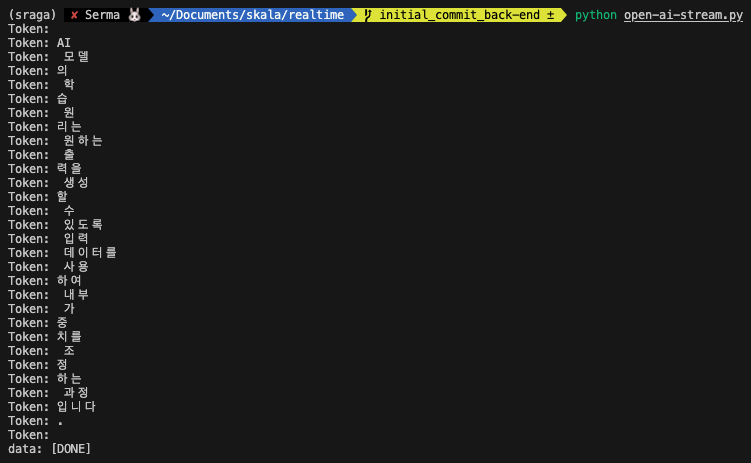
짜잔~
Fast API 서버에 적용해보기
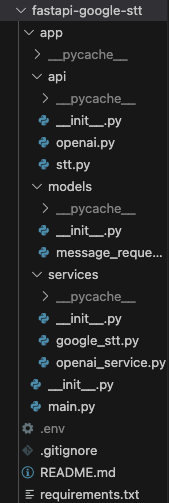
위 사진이 제가 구성한 Fast API 서버의 디렉토리 구조 입니다.
조원분들과의 원활한 코드 공유(?)를 위해 requiremnets.txt 파일도 작성해두었습니다.
프론트와의 소통 방식에 웹소켓을 적용할지 아직 논의중이라 코드가 SSE 방식으로 구현되어 있습니당
main.py
1
2
3
4
5
6
7
8
9
10
11
12
13
14
15
16
17
18
19
20
from fastapi import FastAPI
from fastapi.middleware.cors import CORSMiddleware
from app.api import stt, openai

app = FastAPI()

app.add_middleware(
    CORSMiddleware,
    allow_origins=["*"],
    allow_credentials=True,
    allow_methods=["*"],
    allow_headers=["*"],
)

app.include_router(stt.router, prefix="/stt", tags=["Google STT"])
app.include_router(openai.router, prefix="/openai", tags=["OpenAI"])

@app.get("/")
def read_root():
    return {"message": "Welcome to the FastAPI Google Speech-to-Text service!"}
main.py 에는 cors 설정과 라우터 설정만 작성해두었습니다.
openai.py
1
2
3
4
5
6
7
8
9
10
11
12
13
14
15
16
17
18
19
20
21
22
from fastapi import APIRouter, Request, status
from fastapi.responses import StreamingResponse
from app.services.openai_service import get_streaming_message_from_openai
from app.models.message_request import MessageRequest

router = APIRouter()

@router.post(
    "/streaming/",
    summary="Generate messages using OpenAI (streaming)",
)
async def get_generated_messages_streaming(
    data: MessageRequest,
):
    """
    ## Send a prompt to OpenAI
    - message: str
    """
    print("Streaming started")
    return StreamingResponse(
        get_streaming_message_from_openai(data), media_type="text/event-stream"
    )
StreamingResponse를 통해 실시간으로 결과값을 반환하도록 설정해두었습니다.
stt.py
1
2
3
4
5
6
7
8
9
10
11
12
13
14
15
16
17
18
19
20
21
22
23
24
25
26
from fastapi import APIRouter, UploadFile, File
from fastapi.responses import StreamingResponse
from app.services.google_stt import transcribe_streaming_v2

router = APIRouter()

@router.post("/transcribe/")
async def transcribe_audio(file: UploadFile = File(...)):
    try:
        print(f"File type: {type(file)}")  # 디버깅용 로그
        print(f"File name: {file.filename}")  # 파일 이름 확인


        audio_content = await file.read()  # 파일 내용을 비동기적으로 읽음

        # StreamingResponse를 사용하여 스트리밍 방식으로 데이터 반환
        return StreamingResponse(
            transcribe_streaming_v2(audio_content), media_type="text/event-stream"
        )

    except Exception as e:
        return StreamingResponse(
            (f"data: [Error: {str(e)}]\n\n" for _ in range(1)),  # 에러 메시지를 스트리밍 방식으로 반환
            media_type="text/event-stream",
            status_code=500,
        )
STT 역시 StreamingResponse를 통해 실시간으로 결과 값을 반환하도록 설정했습니다.
MessageRequest 는 DTO 입니다!
[ message_request.py ]
1
2
3
4
from pydantic import BaseModel

class MessageRequest(BaseModel):
    message: str
google_stt.py
1
2
3
4
5
6
7
8
9
10
11
12
13
14
15
16
17
18
19
20
21
22
23
24
25
26
27
28
29
30
31
32
33
34
35
36
37
38
39
40
41
42
43
44
45
46
47
48
49
import os
from dotenv import load_dotenv
from google.cloud.speech_v2 import SpeechClient
from google.cloud.speech_v2.types import cloud_speech as cloud_speech_types

load_dotenv()

PROJECT_ID = os.getenv("PROJECT_ID")

async def transcribe_streaming_v2(audio_content: bytes):
    client = SpeechClient()

    # 데이터를 청크로 나눔
    chunk_length = len(audio_content) // 5
    stream = [
        audio_content[start : start + chunk_length]
        for start in range(0, len(audio_content), chunk_length)
    ]
    audio_requests = (
        cloud_speech_types.StreamingRecognizeRequest(audio=audio) for audio in stream
    )

    recognition_config = cloud_speech_types.RecognitionConfig(
        auto_decoding_config=cloud_speech_types.AutoDetectDecodingConfig(),
        language_codes=["en-US"],
        model="long",
    )
    streaming_config = cloud_speech_types.StreamingRecognitionConfig(
        config=recognition_config
    )
    config_request = cloud_speech_types.StreamingRecognizeRequest(
        recognizer=f"projects/{PROJECT_ID}/locations/global/recognizers/_",
        streaming_config=streaming_config,
    )

    def requests(config: cloud_speech_types.RecognitionConfig, audio: list):
        yield config
        yield from audio

    # Google STT API 호출
    responses_iterator = client.streaming_recognize(
        requests=requests(config_request, audio_requests)
    )

    # 스트리밍 방식으로 응답 반환
    for response in responses_iterator:
        for result in response.results:
            transcript = result.alternatives[0].transcript
            yield f"data: {transcript}\n\n"  # EventStream 형식으로 반환
async과 yield를 적절하게 사용해서 스트리밍 방식으로 응답을 반환합니다.
return을 사용하면 스트리밍 방식으로 구현할 수 없어서
yield를 사용해서 토큰이 새로 올 때마다 반환하도록 설정해두었습니다!(return과 yield)
openai_service.py
1
2
3
4
5
6
7
8
9
10
11
12
13
14
15
16
17
18
19
20
21
22
23
24
25
26
27
28
29
from langchain_openai import ChatOpenAI
from langchain_core.output_parsers import StrOutputParser
from langchain_core.prompts import PromptTemplate
from langchain_teddynote.messages import stream_response
from dotenv import load_dotenv
from app.models.message_request import MessageRequest

load_dotenv()

model = ChatOpenAI(model="gpt-4o-mini", temperature=0.5, max_tokens=1024)
templete='{text}을 영어로 번역해주세요. 번역 된 문장만 출력해주세요.'
prompt = PromptTemplate.from_template(templete)
output_parser = StrOutputParser()
chain = prompt | model | output_parser

async def get_streaming_message_from_openai(data: MessageRequest):
    try:
        # 스트리밍 응답 생성
        response = chain.stream(data.message)
        # stream_response(response)

        for token in response:
            print(f"Token: {token}") # 디버깅 용 코드입니다
            content = f"data: {token}\n\n"
            yield content
        yield "data: [DONE]\n\n"
    except Exception as e:
        # 에러 발생 시 스트리밍 방식으로 에러 메시지 반환
        yield f"[Error: {str(e)}]"
이 코드도 마찬가지로 새로운 토큰이 생성될 때마다 yield로 반환될 수 있도록 설정해두었습니다.
결과 화면
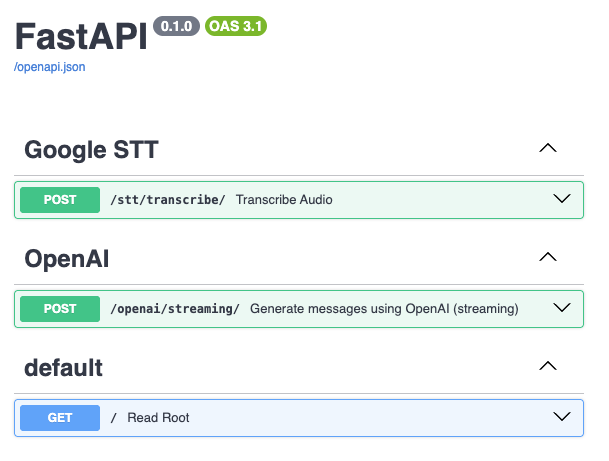
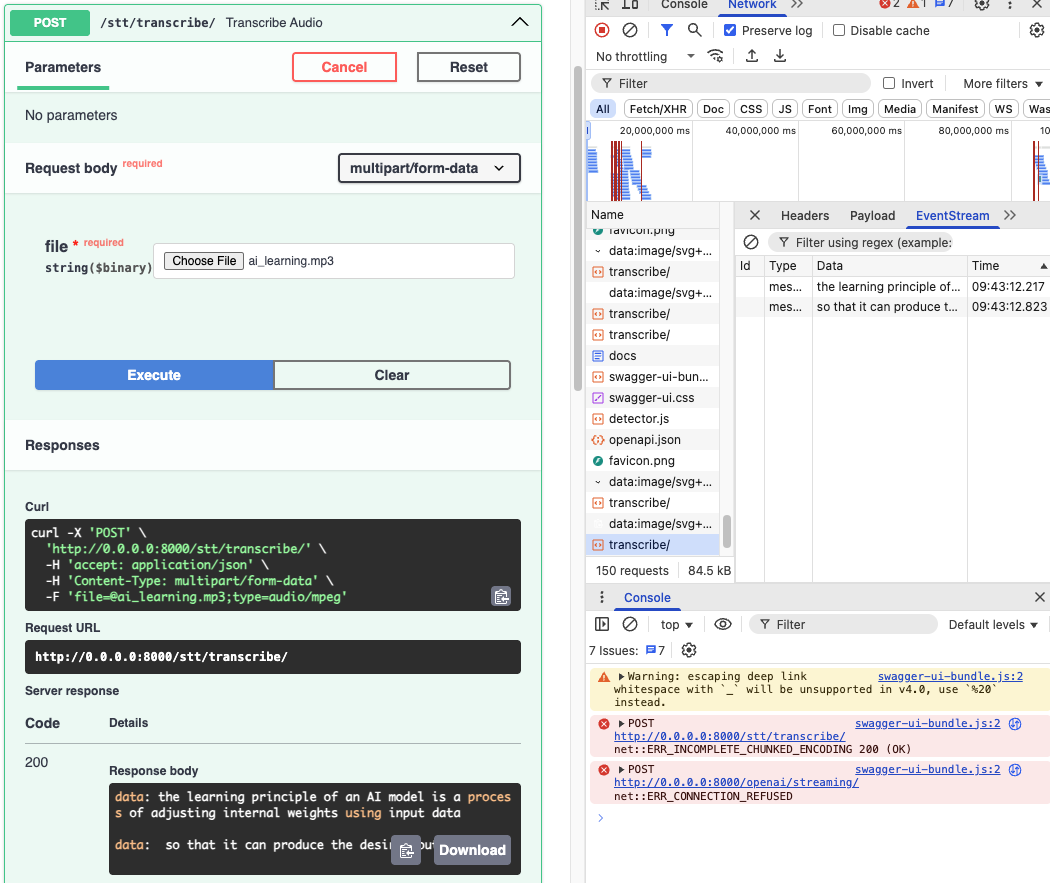
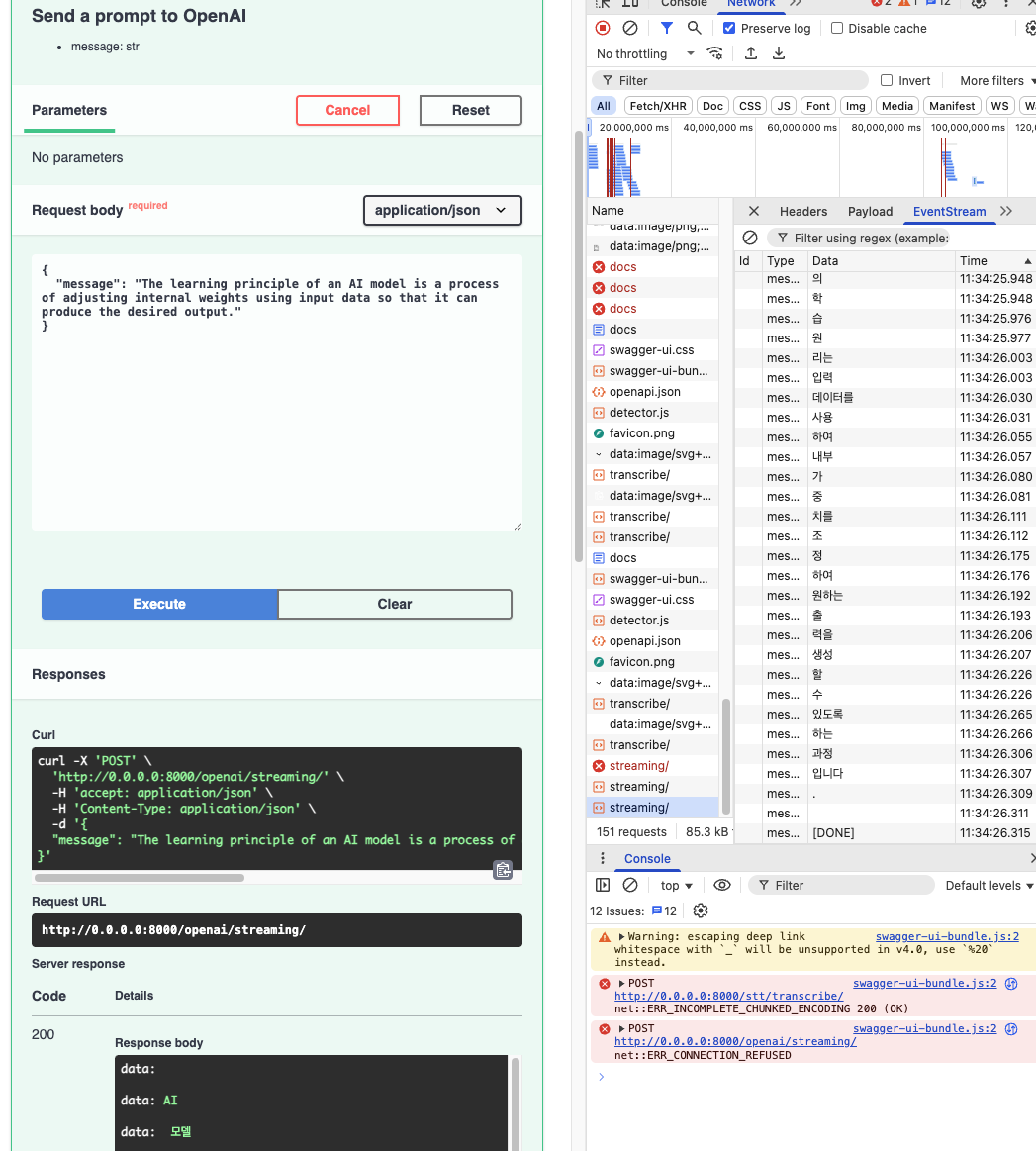
짜잔 ^.^~~
성공입니당 ㅎ.ㅎ..
마치며
아무래도 실시간 양방향 번역이기 때문에 웹소켓의 적용이 불가피할 것 같긴하지만…
음성을 입력받아야하기 때문에 정말정말 불가피할 것 같지만..
그래도 일단은 SSE 방식으로 구현을 해두었습니다!
올바른 구조에 대한 고민이 깊어지는,,프로젝트,,,입니다,,,,,
🤔💭